UTM Link Generator
for Google Analytics 4
Excel template for creating consistent campaign tracking links. Select a channel, enter your campaign and copy the finished URL. Includes automatic validation, the expected GA4 channel classification and performance reporting by channel, category and language.
A UTM link is a regular URL with additional tracking parameters. Google Analytics reads these parameters to identify which channel and campaign brought a visitor to your website. Without UTM parameters, visitors coming from the LinkedIn app, emails or QR codes often appear as “Direct” traffic, making it difficult to attribute them to a specific campaign.
The generator automatically assigns Source and Medium based on the standard channel definitions in Google Analytics 4. You only need to select a channel from the list.
| Feature | Benefit |
|---|---|
| 42 channels across 17 categories | From LinkedIn, Instagram and newsletters to QR codes on catalogs, business cards, trade show badges or vehicles. You can also add your own channels. |
| Automatic formatting | Umlauts, spaces and uppercase letters are converted. For example, “Messe Zürich” becomes messe-zuerich, so GA4 doesn’t treat different spellings as separate entries. |
| Traffic-light validation | Detects missing https, an unexpected domain, duplicate links, URLs that already contain UTM parameters and Google Ads links without auto-tagging. Results are immediately marked ✓, ⚠ or ✗. |
| Languages: DE, FR, IT, EN | The language is appended to the campaign name. If it doesn’t match the destination URL, such as “fr” on a /de/ page, the generator displays a warning. |
| Anchors and parameters | URLs containing a # fragment or an existing “?” are assembled correctly. The UTM parameters are always inserted in the right position. |
| Content suggestions | Leave the Content field blank and the generator inserts a suitable value, such as katalog (catalog) or visitenkarte (business card). This keeps QR codes distinguishable. |
| GA4 channel and tips | Each link shows the GA4 channel it’s expected to be assigned to, along with a brief explanation. |
| Performance reporting | Enter clicks, sessions, conversions and costs. The “Übersicht” (Overview) worksheet calculates sessions per click, cost per click and conversion rate by category, language and channel. |

“Generator” worksheet: The finished URL, validation result, GA4 channel and category are generated automatically. Click to enlarge.
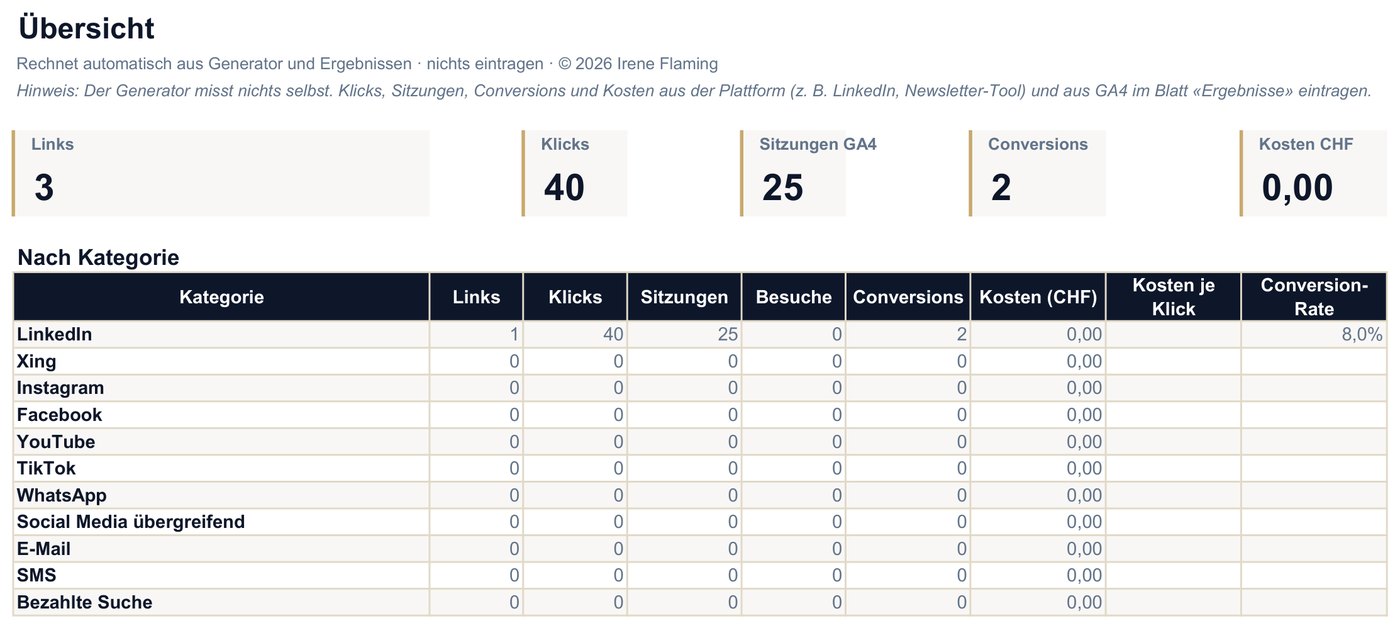
“Übersicht” (Overview) worksheet: Key metrics and performance reporting by category, language and channel.
Download for free
Excel file in a ZIP archive. No registration, no macros.
Related resources: Google Ads Briefing (free, German) · Paid Ad Briefing & Reporting (German) · All downloads